
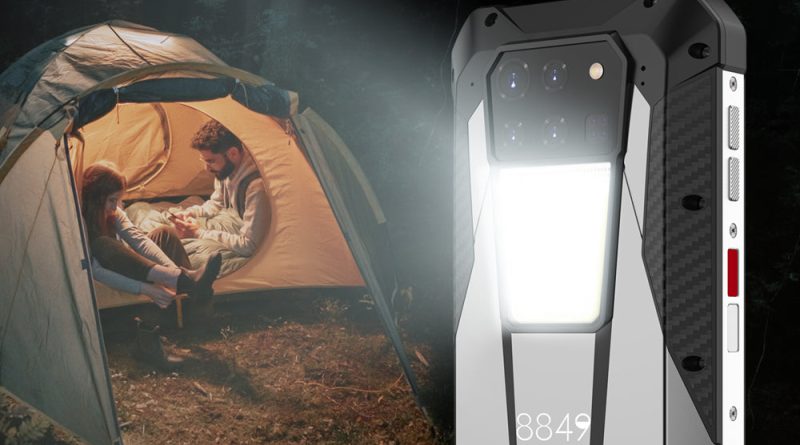
Mobile Technology in Outdoor and Adventure Scenarios: Durability, Navigation, and Off-Grid Power
Let’s be real for a second. You’re standing at the edge of a trail, the wind’s picking up, and your phone—your lifeline to maps, weather, and maybe a podcast—is sitting in your pocket. But is it ready for what’s ahead? Mobile tech has come a long way from the days of clunky GPS units and dying batteries. Today, it’s your compass, your flashlight, and your emergency beacon. But only if it’s built for the wild. Here’s the deal: we’re going to break down the three pillars of mobile tech for adventure—durability, navigation, and off-grid power—without the fluff.
Durability: More Than Just a Tough Case
You know that sinking feeling when your phone slips from your hand and lands face-down on granite? Yeah, me too. Durability isn’t just about a rubber bumper—it’s about engineering. Modern adventure-ready phones, like the iPhone 15 Pro or Samsung Galaxy XCover6 Pro, are rated with IP68 or even IP69K. That means they can survive a dunk in a river or a dust storm in the desert. But here’s the kicker: not all “tough” phones are created equal.
What to Look For in a Rugged Device
- IP rating – IP68 is good for submersion up to 1.5 meters for 30 minutes. IP69K? That’s for high-pressure, high-temperature water jets. Overkill? Maybe. But if you’re kayaking Class IV rapids, you’ll thank me.
- Drop resistance – Look for MIL-STD-810H certification. It’s a military standard that tests for drops, vibrations, and extreme temps. A phone that survives a 1.8-meter fall onto plywood? That’s your hiking buddy.
- Screen protection – Gorilla Glass Victus is common now, but sapphire glass (like in some CAT phones) is scratch-proof. Sand and grit are relentless—don’t underestimate them.
Honestly, I’ve seen people wrap their phones in bulky cases thinking it’s enough. Sure, an Otterbox helps, but if the phone inside isn’t sealed against moisture, you’re just delaying the inevitable. Think of it this way: a rugged phone is like a dry bag for your electronics—it’s the first line of defense, not the last.
Navigation: Beyond Google Maps
Here’s a truth bomb: Google Maps is great for finding a coffee shop, but it’s a disaster on a backcountry trail. Why? No offline topo maps, no barometric altitude, and it eats battery like a hungry bear. Real navigation in the wild demands specialized tools. And I’m not just talking about apps.
GPS vs. GNSS: The Satellite Showdown
Most phones use GPS (USA), but modern flagships also tap into GLONASS (Russia), Galileo (Europe), and BeiDou (China). That’s GNSS—Global Navigation Satellite System. More satellites = faster lock and better accuracy in canyons or dense forests. For example, the Pixel 8 Pro uses dual-frequency GNSS, which cuts through tree cover like a hot knife through butter. It’s not just a spec—it’s the difference between “I think the trail is over there” and “I’m exactly 12 meters from the junction.”
Top Navigation Apps for Offline Use
- Gaia GPS – My go-to. Download USGS topo maps, track your route, and mark waypoints. It even shows public land boundaries (great for avoiding trespassing).
- AllTrails – Perfect for curated trail maps and user reviews. The pro version lets you download maps for offline use.
- Organic Maps – Open-source and lightweight. No ads, no tracking. It’s like a minimalist’s dream for hiking.
- ViewRanger (now Outdooractive) – Excellent for 3D terrain views and augmented reality features. Point your camera at a peak, and it tells you the name and elevation.
But here’s a pro tip: don’t rely solely on your phone. A dedicated GPS unit—like a Garmin inReach Mini 2—is a backup that can send SOS signals via satellite. Your phone’s GPS fails if the battery dies or the screen shatters. That little Garmin? It’s a lifeline. And yeah, it costs money, but so does a helicopter rescue.
Off-Grid Power: The Real Game Changer
You’ve got the tough phone. You’ve got the maps. But without power, it’s just a brick. Off-grid charging is where the rubber meets the trail. And honestly, it’s the most overlooked part of adventure tech. Let’s fix that.
Solar vs. Power Banks vs. Hand Cranks
| Power Source | Best For | Downsides |
|---|---|---|
| Solar panels (e.g., Anker 21W) | Multi-day trips with sun exposure | Slow in clouds; needs direct sunlight |
| High-capacity power bank (20,000 mAh+) | Short trips or basecamp charging | Heavy; must be recharged beforehand |
| Hand crank (e.g., K-Tor) | Emergency backup only | Low output; takes 30 minutes for 10% charge |
| Fuel cell (e.g., BioLite) | Ultralight backpacking | Expensive; fuel cartridges are niche |
Here’s the thing: solar is sexy, but it’s finicky. I once hiked the John Muir Trail with a 14W panel strapped to my pack. On a sunny day, it charged my phone in about 4 hours. On a cloudy day? Forget it. Power banks are more reliable. I swear by the Anker PowerCore 26800—it’ll charge an iPhone 15 Pro about 5 times. But it weighs over a pound. Trade-offs, you know?
If you’re going ultralight, consider a Nitecore NB10000 carbon fiber power bank. It’s only 5.3 ounces but still holds 10,000 mAh. That’s enough for two full phone charges. Pair it with a short USB-C cable (don’t forget the cable—I have, and it’s maddening), and you’re golden.
Charging Habits That Save Your Bacon
- Turn on Airplane Mode – Your phone constantly searches for signal in the backcountry. That drains battery fast. Flip it to airplane mode unless you need GPS.
- Use a low-power mode – iOS and Android both have battery saver modes. Enable them before you hit the trail.
- Charge in the sun – If you’re using solar, set up your panel at camp during midday. Angle it toward the sun. Even a partial charge helps.
- Carry a spare battery – For multi-day trips, two power banks aren’t overkill. One for your phone, one for your GPS or headlamp.
And hey—don’t forget to charge your power bank before you leave. That sounds obvious, but I’ve seen folks show up at the trailhead with a half-full bank. It’s like bringing a half-empty canteen to the desert.
The Unseen Challenge: Connectivity and Data
You might think “off-grid” means no signal. And sure, that’s often true. But some phones now have satellite SOS features. The iPhone 14 and 15 can send emergency texts via satellite—even without cell service. It’s not fast (messages take 15-30 seconds to send), but it’s a game-changer for solo hikers. Similarly, the Garmin inReach lets you send two-way messages via Iridium satellites. That’s real off-grid communication, not just a gimmick.
But here’s a nuance: data-hungry apps like AllTrails or Gaia can eat up your plan if you’re not careful. Download maps before you leave. I usually download a 50-mile radius of topo maps for the area I’m hiking. That way, I’m not streaming anything. It’s a simple step, but it saves battery and data.
Putting It All Together: Your Adventure Tech Kit
So what does a well-rounded mobile setup look like? Let’s imagine a 3-day backpacking trip in the Rockies. You’ve got:
- A rugged phone (say, a Samsung Galaxy XCover6 Pro with IP68 and MIL-STD-810H).
- Gaia GPS with downloaded maps for the entire trail.
- A Nitecore NB10000 power bank (light, reliable).
- A Garmin inReach Mini 2 for satellite SOS and messaging.
- A small solar panel (like the Anker 21W) for camp charging.
That kit weighs under 2 pounds total. It’s not bulky. And it gives you navigation, communication, and power for days. The key is redundancy—your phone can do a lot, but it shouldn’t be your only tool. Think of it like a Swiss Army knife: versatile, but you still carry a dedicated knife for heavy work.
The Future Is Already Here
We’re seeing foldable phones with IP68 ratings (like the Z Fold 5), solar-integrated backpacks, and even phones with thermal cameras (like the CAT S75). The tech is getting smarter, lighter, and more resilient. But no amount of innovation replaces good judgment. You can have the best GPS in the world, but if you don’t know how to read a map, you’re still lost. You can carry a solar panel, but if you leave it in the shade, it’s useless.
So here’s my take: invest in gear that matches your style of adventure. A weekend car camper doesn’t need a satellite messenger. A thru-hiker on the PCT shouldn’t rely on a flimsy power bank. Match the tool to the task. And always—always—carry a paper map as your final backup. Because when the battery dies, the screen