
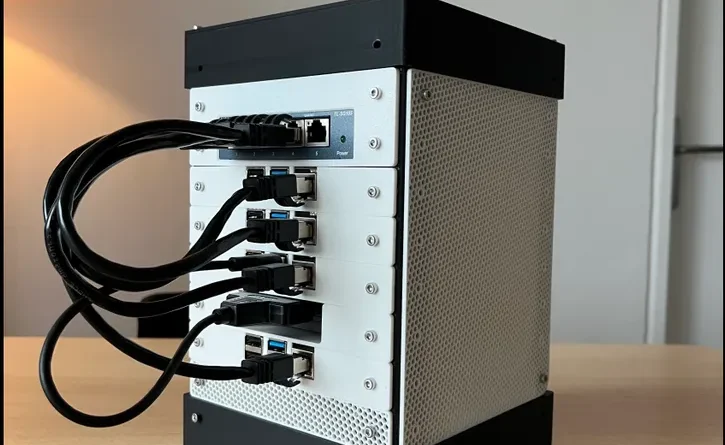
The Practical Guide to Homelab Server Setup and Management for IT Enthusiasts
Let’s be honest. The itch to build your own homelab server is a special kind of tech fever. It starts with a spare PC under the desk, maybe an old laptop, and blooms into a rack humming in the corner of your office. It’s not just about saving money on cloud services—though that’s a perk. It’s about the raw, unfiltered joy of learning by doing.
This guide is for the enthusiast ready to move from theory to practice. We’ll walk through the real-world steps of setting up and managing a homelab server, from choosing your hardware to keeping it all running smoothly. No fluff, just the practical stuff you need.
Phase 1: Laying the Foundation – Your Homelab Hardware
First things first: what are you actually going to run this on? The “best” homelab server is the one that fits your goals, your budget, and, let’s not forget, your power bill. You don’t need a data center in your closet to start.
The Great Hardware Debate: New, Used, or Repurposed?
Here’s the deal. You’ve got three main paths:
- Repurpose Old Gear: That desktop from 2018? Perfect. It’s low-cost (free!) and a fantastic sandbox. The downside? Efficiency. Older hardware can be a power hog.
- Buy Used Enterprise: Scouring eBay for a decommissioned Dell PowerEdge or HP ProLiant server. You get incredible bang for your buck, IPMI for remote management, and that satisfying rack-mount aesthetic. But, well, they sound like jet engines and use enough electricity to make you wince.
- Invest in Modern, Efficient Hardware: Think Intel NUCs, mini-PCs, or building a quiet, low-power system with modern components. It’s the “quiet neighbor” approach—power-sipping and silent, but with a higher upfront cost.
My take? Start with what you have. Learn the software stack. When you hit limits—and you will—you’ll know exactly what to look for in your next upgrade.
Non-Negotiables: What Your Homelab Server Really Needs
Regardless of your path, prioritize these:
- RAM: You will always want more. 16GB is a decent start; 32GB lets you breathe. Virtual machines and containers are memory-hungry beasts.
- SSD for the Host OS & VMs: This isn’t optional anymore. The speed difference for running VMs off an SSD versus a spinning disk is night and day.
- Network Connectivity: A gigabit Ethernet port is standard. A second NIC? Highly recommended for playing with VLANs or setting up a dedicated management network.
- Reliable Power: A basic UPS (Uninterruptible Power Supply) is a homelab rite of passage. It protects your gear from brownouts and gives you time to gracefully shut down.
Phase 2: The Software Soul – Picking Your Platform
Hardware is just metal and silicon without the software that brings it to life. This is where your homelab gets its personality.
The Hypervisor: Your Homelab’s Conductor
The hypervisor is the core software that creates and runs your virtual machines. It’s the foundation. The big three for enthusiasts are:
| Platform | Best For | The Vibe |
| Proxmox VE | Those who want a powerful, all-in-one open-source platform. It handles VMs and Linux containers (LXC) beautifully. | Like a Swiss Army knife—versatile, capable, and community-driven. |
| VMware ESXi | Learners aiming for enterprise relevance. It’s the industry standard, and the free version is robust. | The professional toolkit. Feels like you’re managing a real data center. |
| Hyper-V (Windows Server) | Folks already deep in the Microsoft ecosystem. It’s integrated and powerful. | The native citizen. If your world runs on Windows, this feels like home. |
Honestly, you can’t go wrong with Proxmox for a pure homelab. It’s free, incredibly capable, and has a web interface that just makes sense. It’s become a bit of a darling in the homelab community for good reason.
First Services to Deploy – The “Aha!” Moments
Once your hypervisor is humming, what do you actually run? Start with services that give you immediate utility. This is where the magic happens.
- A Centralized Dashboard: Install Heimdall or Homer. It gives you a clean, browser-based launchpad for all your other services. Instant satisfaction.
- Media Server Suite: The classic trio: Plex/Jellyfin (for streaming), Sonarr (TV shows), Radarr (movies). It turns your lab into a personal Netflix.
- Network-Wide Ad Blocking: Pi-hole in a lightweight VM or container. The moment you set this as your DNS server and see ads vanish from every device in your house… it’s glorious.
- Backups: Set up a simple Samba file share or an NFS server. Then use Veeam Community Edition or even rsync scripts to back up your other machines to it. The peace of mind is profound.
Phase 3: The Art of Homelab Management & Security
Setting it up is only half the battle. Managing it—keeping it secure, updated, and documented—is what separates a fun project from a resilient homelab server setup.
Documentation: Your Future Self Will Thank You
You will forget. You’ll forget the static IP you assigned, the weird port you used for that one service, the password for the admin account you created at 2 AM. Document everything. Use a simple wiki (like BookStack) or even a well-organized Markdown file in a private GitHub repo. Write down IP schemes, credentials (in a password manager!), and the steps you took to fix that weird Docker error.
Security Isn’t Optional, Even at Home
Look, your homelab probably won’t be targeted by nation-states. But basic hygiene is critical.
- Isolate, Isolate, Isolate: Put your IoT devices on a separate VLAN. Keep your management interface on a different network segment than your regular devices. This is Networking 101, and it’s the single best thing you can do.
- Firewalls Are Your Friend: Even the basic firewall on your hypervisor or router. Deny all by default, then explicitly allow only the traffic you need.
- Updates, Updates, Updates: Automate them where you can. Set a monthly calendar reminder to check for hypervisor and critical service updates. An unpatched service is the easiest way in.
The Homelab Mindset: Embracing the Journey
Here’s the truth they don’t always tell you: your homelab will break. You’ll take down your entire network while tinkering with a firewall rule. You’ll accidentally delete a VM. That’s not failure—that’s the point.
This sandbox is where you learn disaster recovery, where you understand why backups are architected a certain way, where you feel the consequences of a misconfiguration in a safe environment. The hum of the fans isn’t just noise; it’s the sound of a playground for your curiosity. It’s where theory from a certification guide becomes muscle memory.
So start simple. Make it useful. Break it, fix it, and learn something every single time. That’s the real practical guide. The rest is just details.