
Understanding and Mitigating Digital Eye Strain: Monitor Technology and Workspace Ergonomics
Let’s be honest—your eyes are probably tired right now. You’re reading this on a screen, maybe squinting a little, maybe rubbing your temples. That’s digital eye strain. It’s not a myth, it’s a real thing. And honestly, it’s become the modern office worker’s silent headache. But here’s the good news: you don’t have to live with it. A few smart tweaks to your monitor and your desk setup can make a world of difference.
What Exactly is Digital Eye Strain?
Digital eye strain—sometimes called computer vision syndrome—is that cluster of symptoms you feel after hours staring at a screen. Dry eyes, blurred vision, headaches, neck pain… sound familiar? It’s not just about “looking too long.” It’s about how your eyes work overtime to focus on pixels instead of natural light.
Think of it this way: your eyes are designed to see contrast in the real world. Trees, faces, a cup of coffee. But screens? They’re made of thousands of tiny flickering lights. Your eye muscles have to constantly adjust to that artificial glow. Over time, they get fatigued. It’s like holding a book six inches from your face for eight hours—you’d feel it, right?
The Usual Suspects: Symptoms You Might Ignore
- Dry, gritty feeling in your eyes (like sandpaper)
- Blurred vision that comes and goes
- Headaches that creep up around 3 PM
- Neck and shoulder stiffness from leaning forward
- Trouble refocusing when you look away from the screen
If you nodded along to more than two of these, you’re not alone. In fact, a 2023 study found that nearly 70% of adults report some form of digital eye strain. That’s a lot of tired eyes.
Monitor Technology: Your First Line of Defense
Here’s the deal—not all monitors are created equal. If you’re still using that old office beige box from 2010, your eyes are paying the price. Modern monitor technology has made huge strides in reducing strain. But you need to know what to look for.
Refresh Rate: More Than Just Gaming
You might think refresh rate is only for gamers, but it matters for everyone. A standard 60Hz monitor refreshes the image 60 times per second. That flicker—even if you don’t consciously see it—can tire your eyes. A 120Hz or 144Hz monitor? Smoother, less flicker, less fatigue. It’s like the difference between a strobe light and a steady lamp.
Blue Light Filters: Not Just a Gimmick
Blue light gets a bad rap, but it’s not all evil. It’s actually part of natural sunlight. The problem is overexposure at close range for hours. Most modern monitors now have built-in blue light filters or “low blue light” modes. Turn them on, especially in the evening. Your eyes will thank you—and you might sleep better too.
Resolution and Pixel Density
Ever notice how text looks fuzzy on some screens? That’s low pixel density. A 1080p monitor at 24 inches is fine, but a 27-inch screen at 1080p? You’ll start seeing individual pixels. That forces your eyes to work harder to interpret shapes. Go for a higher resolution—1440p or 4K—if you can. The sharpness reduces squinting, which reduces strain.
Anti-Glare Coatings and Matte Screens
Glare is a silent enemy. That reflection of the window behind you? It’s making your eyes work overtime to separate the image from the reflection. Matte screens or anti-glare coatings cut down on that. If your monitor is glossy, consider a simple anti-glare screen protector. It’s a cheap fix that works surprisingly well.
Workspace Ergonomics: Where Your Body Meets the Screen
Monitor tech alone won’t save you. You need to set up your workspace so your body isn’t fighting against the screen. This is where ergonomics comes in—and no, it’s not just about a fancy chair.
The 20-20-20 Rule (It Actually Works)
Every 20 minutes, look at something 20 feet away for 20 seconds. Sounds simple, right? But most of us forget. Set a timer. Seriously. It gives your eye muscles a chance to relax. Think of it as a mini stretch for your eyes.
Monitor Position: Not Too High, Not Too Low
Your monitor should be at arm’s length—roughly 20 to 28 inches from your eyes. The top of the screen should be at or just below eye level. That way, you’re looking slightly downward, not straight ahead or up. Why? Looking down slightly reduces the surface area of your eyes exposed to air, which helps with dryness. Plus, it’s a more natural neck angle.
Pro tip: If you wear bifocals, you might need to lower the monitor a bit more. Experiment until your neck doesn’t hurt.
Lighting: The Overlooked Culprit
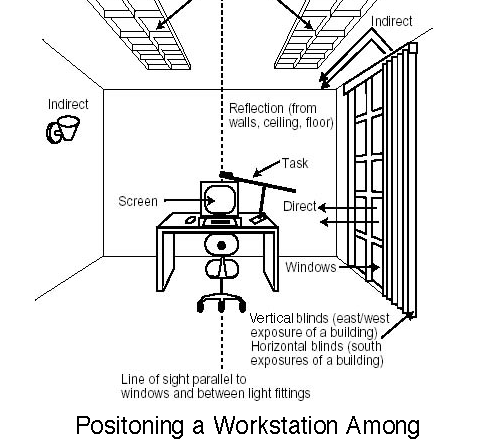
Harsh overhead lights or bright windows directly behind your screen? That’s a recipe for squinting. Ideally, your ambient light should be about half as bright as your monitor. Use blinds or curtains to control natural light. And avoid placing a lamp right next to your screen—it creates contrast that tires your eyes.
Here’s a quick table to summarize the ideal lighting conditions:
| Lighting Factor | Ideal Setup |
|---|---|
| Overhead lights | Dimmable, indirect |
| Window position | To the side, not behind or in front |
| Monitor brightness | Matches ambient light level |
| Desk lamp | Task lighting, not shining on screen |
Small Habits, Big Impact
You know what else helps? Blinking. Seriously. We blink less when staring at screens—like, 60% less. That’s why your eyes feel dry. Make a conscious effort to blink fully. Or use lubricating eye drops (the preservative-free kind).
Another trick? Adjust your font size. If you’re leaning in to read, it’s too small. Zoom in. Nobody’s judging. And if you use dark mode, that can help reduce glare, but it’s not a cure-all. Some people find light text on dark backgrounds causes more eye fatigue—so test what works for you.
Putting It All Together: A Simple Routine
Let’s wrap this up with a practical checklist. You don’t need to overhaul your entire life. Just try these steps for a week:
- Adjust your monitor to eye level and arm’s length.
- Turn on blue light filter after 6 PM.
- Set a timer for the 20-20-20 rule.
- Reduce overhead lighting or use a desk lamp instead.
- Blink intentionally—like, every few minutes.
- Consider upgrading to a higher refresh rate or matte screen if you can.
Honestly, the biggest change is awareness. Once you start noticing how your eyes feel, you’ll naturally make better choices. That’s the real win.
The Bigger Picture
Digital eye strain isn’t just about discomfort—it’s about productivity, mood, and long-term vision health. Your eyes are incredible, but they’re not designed for 10-hour screen marathons. By combining smarter monitor technology with a few ergonomic tweaks, you’re not just fixing a symptom. You’re building a workspace that respects your body.
And that’s worth squinting less for.